
Public posts: What they are and how they can help you
So, you’ve joined SoSpoilt and you’re excited to upload some content to your page. But while creating your first post, you notice the option to make it public.
No doubt you’re wondering what this means, and what the benefits are of sharing public posts. Luckily, this article explains everything you need to know.
What are public posts?
Usually, posts on your SoSpoilt page can only be seen by fans who pay to subscribe to you. But if you choose to make a post public, it can be seen by anyone with a SoSpoilt account for free.
If you joined SoSpoilt to monetize your content, you may question the benefit of public posts. After all, you already share free-to-view content on your blog or social media channels.
But trust us: when used correctly, public posts can seriously boost your income, by encouraging more fans to subscribe and connect with you.
Why should you create public posts?
1) Make your page more attractive to potential subscribers.
When fans land on your SoSpoilt page, you want to quickly grab and hold their attention. Because the longer fans stay on your page, the more time you have to convince them to subscribe.
If you have no public posts, fans probably see something like the below when they first hit your page:
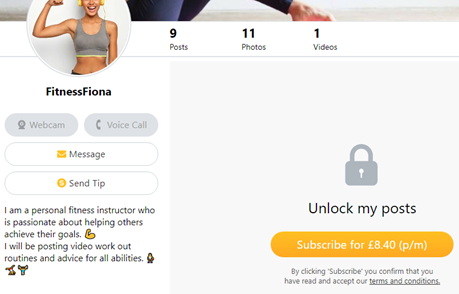
Example of a SoSpoilt page with no public posts
Other than your bio and profile photo, there’s little for fans to engage with.
Adding some public posts could therefore improve your page’s performance, by giving new fans a reason to stick around and scroll through your free-to-view content.
Even if they don’t subscribe on their first visit, public posts may encourage fans to follow your page for free. And with a little more time and convincing, followers are likely to subscribe further down the line.
2) Easily give fans a taste of your content
We all like to try before we buy. Public posts are great way for showing fans the quality and kind of content you create before they subscribe.
As public posts are only intended to give fans a taste of your content, you don’t need to spend time creating anything new. Instead, put old or existing content to work that best showcases your talent.
For instance, you could easily create public posts featuring:
- Popular content from your social media channels
- Short snippets of videos available only to your subscribers
- Peeks of you creating new content for your subscribers
Just remember that public posts can be seen by anyone, so should not contain any 18+ themes or NSFW content.
3) Promote messages and live chats
Finally, subscriptions are not the only way you can earn on SoSpoilt.
You can also earn by offering pay-per-minute live chats and pay-to-view messages to any fans (even those who don’t subscribe).
Public posts are a great way to promote these features to your entire audience.
For instance, you could post what time you’ll be available on live chat. Or post reminders to DM you for personalised content, like in the example post below.

Example of a public post promoting messages and live chats
How do you create public posts?
Now you know the benefits, it’s time to start sharing some public posts on your SoSpoilt page.
To create a public post, simply . . .
- Log in to your SoSpoilt account.
- Select the Posts tab on your home dashboard.
- Create a new post, by writing in the text box provided or attaching photos and/or videos.
- Tick the Public Post
- Hit Post!
Not on SoSpoilt yet? It’s quick, easy, and totally free to sign up. Plus, our Support Team are on hand 24/7 to help new creators find their feet.
